 GEPCO • Gujranwala • PITC portal
This page focuses only on Gujranwala Electric Power Company, for its consumers. Enter your 14-digit reference number to see your current bill, due date, units and payment status instantly. The official portal is bill.pitc.com.pk/gepcobill, and this checker takes live data from that same portal. For a gepco online bill view of the current month, enter your reference number above, and the gepco bill check result shows the amount, due date, units and payment status.
Look at the image below to see where Reference No. is printed on the bill. Enter that same 14-digit number in the checker above, without spaces or dashes, and your bill will open. This number is different for every connection. Below it there is also a 10-digit Customer ID, but only the reference number is used to check the bill.
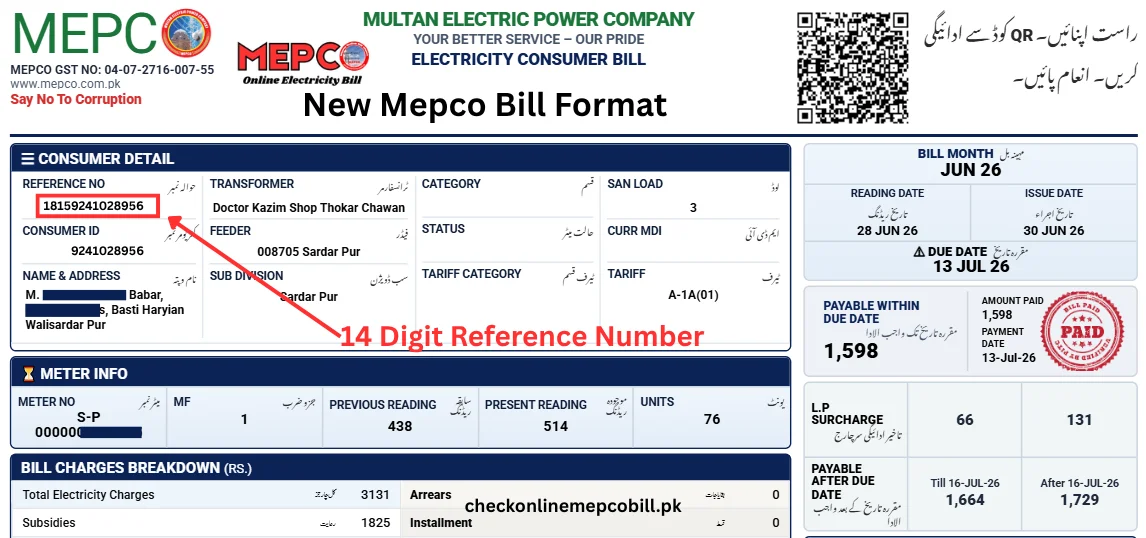
Your reference number is the 14-digit number that identifies your electricity connection. It is printed at the top of your printed bill, next to the words "Reference No.". Enter all 14 digits in the checker above, without spaces or dashes, and your bill opens in a new tab. The number is followed by a letter, U for urban or R for rural, but you only enter the digits.
Always copy the number from your most recent printed bill. A new connection, or a connection that was changed or transferred, can have a different number, and an old bill may carry a number that no longer matches. If you have no printed bill at all, ask at your nearest GEPCO office with your CNIC and address, and they can find the connection record for you.
The header is the top section of the bill. It shows the company name, your name and address, the billing month, and the consumer detail box where the reference number sits. The guide image above shows the exact spot. Below the reference number there is also a 10-digit customer ID, which the PITC portal's own form accepts as an alternative search option.
Count the digits as you type. Fourteen digits, numbers only, no spaces, no dashes, no letters. The most common reason for a "no bill record" message is a missing or extra digit, so read the number twice before pressing Check Bill. If the message still appears, check that the company name on the bill is GEPCO and that the bill for the current month has been issued.
GEPCO, the Gujranwala Electric Power Company, distributes electricity in six districts of north Punjab. Its head office is at 565-A Model Town, G.T. Road, Gujranwala. For faults, outages and billing complaints, call the helpline 118, which works around the clock, or send an SMS complaint to 8118. GEPCO also provides an online complaint form on its own website, gepco.com.pk, where you choose your circle and division and describe the problem. Before you call or write, keep your reference number and a copy of the bill ready.
| Detail | GEPCO |
|---|---|
| Full name | Gujranwala Electric Power Company Limited |
| Area | Gujranwala, Sialkot, Gujrat, Narowal, Hafizabad, Mandi Bahauddin |
| Official bill page | bill.pitc.com.pk/gepcobill |
| Reference number | 14 digits, numbers only |
| Helpline | 118 and 8118 (complaint SMS) |
GEPCO serves Gujranwala district, including Gujranwala city, Kamoke, Nowshera Virkan and Wazirabad; Sialkot district, including Sialkot city, Daska, Sambrial and Pasrur; Gujrat district, including Gujrat city, Kharian, Lalamusa and Sarai Alamgir; Narowal district, including Narowal city, Shakargarh and Zafarwal; Hafizabad district, including Hafizabad city and Pindi Bhattian; and Mandi Bahauddin district, including Mandi Bahauddin city, Phalia and Malakwal. If your connection is in one of these districts, your bill is issued by GEPCO. Lahore belongs to LESCO, Jhelum to IESCO and Sargodha to FESCO.
A duplicate copy is useful whenever the printed bill is lost, damaged or never delivered. You need it to pay at a bank or post office, to prove an address or a connection for official work, and to keep a record of what you were charged each month. The duplicate downloaded from the checker carries the same details as the printed bill, including the reference number, the amount, the due date and the payment status, so it works wherever the printed bill works.
Enter your 14-digit reference number in the checker above and press Check Bill. The original bill opens in a new tab. Use your browser's print option and choose "Save as PDF" to download a duplicate copy, or print it directly if a printer is connected. Save the PDF on your phone as well, so the reference number and the amount are always at hand. The duplicate is free, and you do not need an account to download it.
You can pay with only the 14-digit reference number. The amount appears automatically once the number is entered, so you do not need to type it yourself. Pay on or before the due date printed on the bill to avoid a late payment surcharge. After paying, keep the receipt or transaction ID, and check the bill again after 24 to 48 hours to confirm the paid status shows online.
GEPCO bills are paid through the national 1Bill system, so every bank, wallet and ATM that offers bill payments can accept them. Choose whichever method is easiest for you. The reference number is the same for all of them.
Visit any bank branch that accepts utility bills, give the counter your reference number or your printed bill, and pay in cash or from your account. Ask for a stamped receipt and keep it until the paid status shows online.
Open your bank's mobile app, Easypaisa or JazzCash, go to bill payments, choose the electricity or 1Bill option, and enter your reference number. Confirm the amount shown, pay, and save the transaction ID shown on the confirmation screen.
At an ATM, choose the bill payment option, select electricity or 1Bill, and enter your reference number on the keypad. The amount appears on screen. Confirm it, complete the payment, and take the printed slip as your receipt.
The Gujranwala Electric Power Company is the distribution company for six districts of north Punjab, serving millions of homes, shops, farms and factories. It operates the local grid, the feeders and the meters in its area, reads the meters each month, and issues the monthly bills through the PITC portal. People often call the bill a WAPDA bill, but WAPDA no longer issues household electricity bills, and the company name printed on the bill is GEPCO. GEPCO is also among the distribution companies in the government's privatisation programme, in the first batch alongside FESCO and IESCO.
Every bill has the same main parts. Reading them in order tells you who the bill belongs to, which month it covers, how much electricity was used, and what is owed. The exact rates are printed on the bill and take precedence over any general explanation, because rates change with NEPRA decisions and government notifications.
This is your name and the address of the connection, as recorded by GEPCO. If either is wrong, ask at your local GEPCO office to have the record corrected, and take your CNIC and the latest bill with you.
The 14-digit reference number is the key to the connection. It is used to check the bill online, to pay through any bank or wallet, and to register complaints. Keep it private, and always copy it digit by digit.
Below the reference number, the bill shows a 10-digit customer account number, also called the customer ID. It identifies the same connection, and the PITC portal's own form accepts it as an alternative way to search for a bill.
The billing month tells you which month's use the bill covers. Bills are issued monthly, so the month on the bill and the month you are living in are usually the same or one month apart, depending on the reading date.
The issue date is when the bill was produced. The due date is the last date to pay without a late payment surcharge. Pay on or before the due date, and keep the receipt until the paid status shows.
The bill shows the meter reading from the previous month and the reading for the current month. Both are printed on the bill so you can compare them with the meter itself if a reading looks wrong.
Consumption is the difference between the current reading and the previous reading, measured in units (kWh). This is the number the energy charge is based on, and it decides which slab rate applies to your bill.
This is any amount left unpaid from earlier bills, carried forward into the current bill. If you paid the previous bill in full, this line should be zero. If it is not zero and you believe you paid, check your payment receipt and raise it with GEPCO on 118, with the transaction ID ready.
GEPCO bill check online gives consumers in Gujranwala, Sialkot, Gujrat, Narowal, Hafizabad and Mandi Bahauddin districts the current month's bill without waiting for the printed copy. The checker on this page reads the same PITC portal that produces the printed bill, so the amount, due date, units and payment status match the paper bill for the same reference number. The sections below add what the rest of this page does not yet cover: where GEPCO's circle and division offices are, which services can be requested at those offices, how the protected and non-protected categories work, and answers to the questions consumers ask most often.
GEPCO's field work is organised into circles, each headed by a Superintending Engineer, with divisions under them headed by Executive Engineers and sub-divisions run by Sub-Divisional Officers. The circle and division serving a connection are printed on the bill. Knowing them tells you which office holds the record for that connection, and billing, meter and new-connection matters are handled fastest at the division or sub-division that owns the record.
The head office is at 565-A, Model Town, G.T. Road, Gujranwala. The six circles below are the current field organisation as listed in GEPCO's circle and division listings. One official tender document describes the six circles differently, with two circles based in the Gujranwala area rather than a separate Hafizabad circle, so the exact circle list should be confirmed on gepco.com.pk if it matters for a formal matter; for finding the right local office, the division named on the bill is the reliable guide in either case.
| Circle | Main office town | Divisions and areas covered |
|---|---|---|
| Gujranwala | Gujranwala city | Gujranwala city, Model Town, Civil Lines, Baghbanpura, Kamoke, Nowshera Virkan, Wazirabad, Gujranwala Cantt |
| Sialkot | Sialkot city | Sialkot city, Sialkot Cantt, Daska, Sambrial, Pasrur |
| Gujrat | Gujrat city | Gujrat city, Kharian, Lalamusa, Sarai Alamgir, Jalalpur Jattan, Dinga |
| Narowal | Narowal | Narowal, Shakargarh, Zafarwal, Baddomalhi |
| Hafizabad | Hafizabad city | Hafizabad, Pindi Bhattian, Sukheke, Jalalpur Bhattian, Kaleke Mandi |
| Mandi Bahauddin | Mandi Bahauddin city | Mandi Bahauddin, Phalia, Malakwal, Qadirabad |
Customer service centres operate at the circle offices for billing complaints, new-connection queries and meter matters. Anyone visiting an office should carry the CNIC, a copy of the latest bill and the reference number. Office hours follow normal government working hours on working days. Outside those hours, the 118 helpline and the 8118 SMS service take fault reports and complaints, and the CCMS online complaint system on the PITC portal accepts complaints at any time and gives a tracking number.
A new connection is applied for through the online new-connection system, known as ENC, and at the local sub-division office, with the CNIC, proof of ownership or tenancy, and details of the load required. The office surveys the site, issues a demand notice for connection charges and any service line work, and installs the meter once the demand notice is paid. The shared new-connection guide on this site explains the national steps in detail.
A change of load, an increase or a decrease, is needed when the equipment on the premises changes materially, for example when air conditioners or a motor are added. The office checks the service line and meter capacity and updates the sanctioned load on the record; fixed charges on later bills follow the new sanctioned load, so the change should be applied for before the new load is used. A change of name after a property sale or family transfer, and a change of tariff category such as domestic to commercial, are handled at the division office with the CNIC, the transfer documents and a copy of the latest bill. The reference number usually stays the same, because it belongs to the connection point.
Meter problems should be reported to the sub-division office at once: a meter that has stopped, runs visibly fast or slow, is damaged, or has a broken seal must not be opened or tampered with by the consumer. The office tests or replaces the meter and adjusts billing if a fault is confirmed. A reading that looks wrong should be raised the same way, with a photograph of the meter reading taken on the same day.
Net metering is available for consumers who install solar panels. Under the national net metering rules, an approved solar system with a bidirectional meter exports surplus electricity to the grid and earns credit for the exported units on the bill. The application goes through GEPCO with the system details and the installer's credentials, and the bidirectional meter is installed after approval. The current rules and the allowed capacity should be confirmed at the division office before equipment is purchased, and the process should be started well before the installation is completed, because generation without an approved arrangement is not credited.
Domestic consumers are divided into protected and non-protected categories, and the category decides which slab rates apply. A consumer is treated as protected when the average monthly consumption over the previous six billing cycles is 200 units or less, and protected consumers are charged the lower slab rates. The category is judged on the six-month average, not on a single month, and the category printed on the bill is the operative one. A household that crosses the 200-unit average loses the protected rates and moves to the higher non-protected slabs, and the fixed charges also rise, so the total bill can jump sharply even when the increase in units is modest. Steady, moderate use is the way to keep protected status, and the bill calculator on this site shows the difference between the two categories.
No. The checker on this page is an independent guide that reads the official PITC portal, which is the system that produces GEPCO bills. The bill itself, the amount and the due date come from that official record. For any dispute about the amount, the GEPCO office and the bill copy are the final authority. A gepco duplicate bill from this check is valid at banks and payment apps.
Yes. The 14-digit reference number printed at the top of every printed bill is the key to the record. The PITC portal's own form also accepts the customer ID as an alternative way to search for a bill. GEPCO bill check online reads the same record that the payment channels use, so the amount confirmed here is the amount the payment channel will show. An online bill check gepco households run before the due date shows the same amount, due date and units.
Re-read the number digit by digit from the newest printed bill and try again, and check that the company name on the bill is GEPCO. A number from another company will not match. Bills appear after the meter reading for the month, so a bill that has not been issued yet will also return no record. The gepco bill online result and the portal bill carry the same reference number, so a duplicate bill from either source matches.
Take a photograph of the meter reading and a copy of the bill to the sub-division office serving the connection. The office verifies the reading and issues a corrected bill where the reading is confirmed wrong. The 118 helpline can register the complaint, but a correction needs the photograph and the bill copy at the office.
Yes. Payment through a bank's mobile app or a wallet app works from anywhere, using only the reference number. The paid status can take 24 to 48 hours to show online, because collections settle in batches.
Yes, under the national net metering rules. The application is made through GEPCO, the system is inspected, and a bidirectional meter is installed after approval. Surplus units exported to the grid are credited on the bill.