 LESCO • Lahore • PITC portal
This page focuses only on this company, for consumers of Lahore Electric Supply Company. Enter your 14-digit reference number and instantly see your current lesco bill, due date, units and payment status. The official portal is bill.pitc.com.pk/lescobill, and this checker takes live data from that same portal. For a quick lesco bill online check, enter the number above; the result is ready before the due date. The result works as a lesco duplicate bill you can print or save as a PDF.
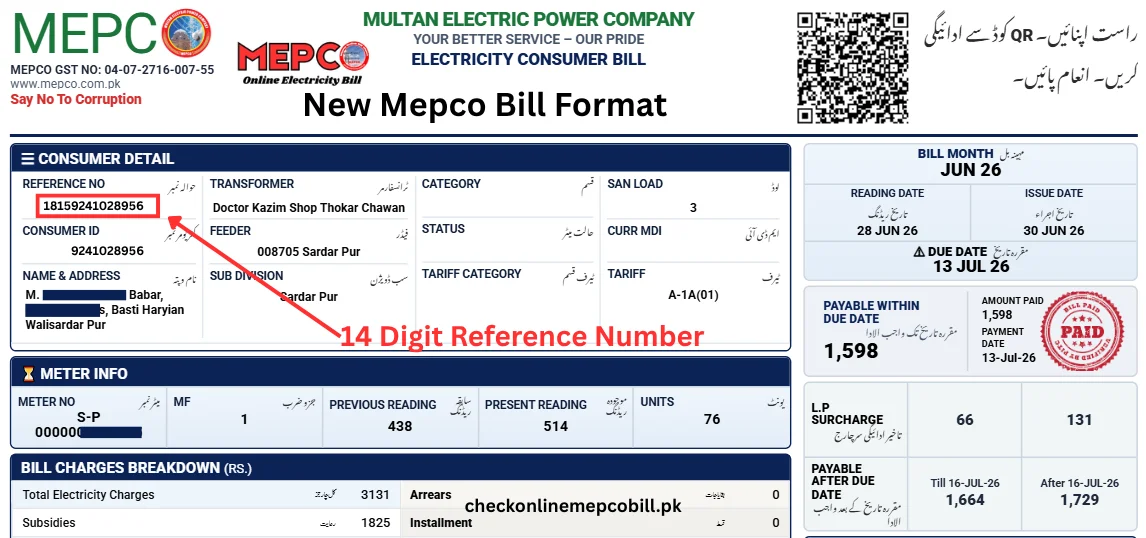
In the picture below, see where the label Reference No. is printed on the bill. Enter the same 14-digit number in the checker above, without spaces or dashes, and your bill will open. This number is different for every connection. Below it is the 10-digit Customer ID, but only the reference number is used to check a bill.
High Speed Secure Search Ready to Print
Follow these steps to view, download and print your bill. The whole process takes less than a minute, and you only need the 14-digit reference number from an old printed bill.
If the bill does not open, re-check the number digit by digit, make sure the company name on the bill is LESCO, and try again. Bills are issued in batches by subdivision, so if your bill has not been generated yet, check again after two or three days.
Lahore Electric Supply Company, commonly called LESCO, is the company that distributes electricity in Lahore and its surrounding areas. Its head office is at 22-A Queens Road, Lahore. LESCO buys power from the national grid, delivers it through its own network of grid stations, feeders and meters, reads the meters each month, and issues the monthly bills. People often call the bill a "WAPDA bill" too, but the name printed on the bill is LESCO's, because WAPDA no longer issues household bills.
| Detail | LESCO |
|---|---|
| Full name | Lahore Electric Supply Company |
| Area | Lahore, Kasur, Sheikhupura, Okara, Nankana Sahib |
| Head office | 22-A Queens Road, Lahore |
| Official bill page | bill.pitc.com.pk/lescobill |
| Company website | lesco.gov.pk |
| Reference number | 14 digits, numbers only |
| Helpline | 118 and 0800-00118 (toll-free) |
LESCO serves 5 districts: Lahore, Kasur, Sheikhupura, Okara and Nankana Sahib. Apart from Lahore city, the bills of towns and villages in these districts also come from this company. So if you live in Lahore, Kasur, Sheikhupura, Okara or Nankana Sahib, this company issues your bill. Connections in Gujranwala belong to GEPCO, in Sargodha to FESCO, and in Multan to MEPCO, and those companies have their own pages on this site.
For day-to-day work, LESCO divides its area into operation circles, and each circle contains divisions and sub-divisions. Your division and sub-division are printed on the bill, and they tell you which local office handles your connection, your meter reading and your complaints. The circle offices cover Lahore city areas as well as the regional districts, so the office printed on your bill is the first place to visit for a correction or a new connection matter.
LESCO delivers electricity from the national grid to homes, shops, farms and factories in its five districts, through grid stations, feeders, transformers and low-voltage lines.
LESCO maintains the network, repairs faults, replaces damaged poles, wires and transformers, and carries out planned maintenance shutdowns, which are announced in advance where possible.
LESCO reads meters each month, records the readings in the PITC billing system, and issues the monthly bill. The same record is what the checker on this page reads.
LESCO processes applications for new connections, load extensions and name changes through its ENC online system and its offices, and issues a demand notice for the approved work.
When demand exceeds supply, LESCO carries out load management, commonly called load shedding, by feeder and by schedule, and publishes shutdown information through its complaint and information channels.
LESCO registers faults and complaints through its helplines and the CCMS complaint system, sends them to the local office for the area, and tracks them until they are resolved.
LESCO checks for meter tampering and illegal connections, takes action against theft under the law, and asks consumers to report suspected theft through the helpline.
LESCO runs customer service centres at sub-division, division, circle and head office level for bill corrections, duplicate bills, new connections, complaints and general help.
Enter the 14-digit reference number from the top of your printed bill in the checker above, without spaces or dashes, and press Check Bill. Your current bill opens in a new tab, showing the amount, the due date, the units and the payment status. This is the simplest method, because the bill appears online before the paper bill arrives, and there is time to pay before the due date. No login or account is needed.
The 10-digit customer ID is printed below the reference number on the bill. The PITC portal's own search form accepts this customer ID as a search option. This page's checker uses the 14-digit reference number, so if you only have the customer ID, open the PITC portal form at bill.pitc.com.pk/lescobill and choose the customer ID option there.
The reference number has 14 digits and is the main key for a connection. It is different for every connection and is used to check the bill online and to pay through any bank or wallet. The customer ID has 10 digits and identifies the same connection in LESCO's records. Both are printed in the consumer detail box at the top of the bill. Keep both private, and always copy them digit by digit, because one wrong digit gives a "no bill record" result.
The easiest way is an old printed bill. The reference number is next to "Reference No." at the top, and the customer ID is printed below it. The guide image above shows the exact spot. Always use the most recent bill, because a changed or transferred connection can have a different number.
A CNIC number alone does not open a bill on the PITC portal, and there is no online CNIC lookup that returns a reference number. If you have lost every old bill, visit your nearest LESCO office with your CNIC and your address, and the office can find the connection record for you. CNIC and mobile registration on LESCO's own website is for bill alerts and messages, not for checking a bill.
The PITC portal form at bill.pitc.com.pk/lescobill offers both search options, reference number and customer ID. If you have either number, the portal can open the bill. If you have neither, the portal cannot help, and the LESCO office, with your CNIC and address, is the right place to ask.
Open EasyPaisa or JazzCash, go to bill payments, choose the electricity or 1Bill option, and enter your 14-digit reference number. The amount appears automatically. Confirm it, pay before the due date, and save the transaction ID shown on the confirmation screen.
NayaPay also offers bill payments through the 1Bill option in its app. Enter the reference number, confirm the amount shown, and pay. Save the receipt in the app until the paid status shows online.
Every major bank app in Pakistan has a bill payment or 1Bill section. Choose electricity, enter the reference number, verify the name and amount shown on the screen, and pay. After payment, keep a screenshot of the transaction ID. Payment usually clears within 24 to 48 hours.
Take your printed bill or your duplicate printout to any commercial bank branch that accepts utility bills, and pay in cash or from your account. Ask for a stamped receipt and keep it until the paid status shows online.
At an ATM, choose the bill payment option, select electricity or 1Bill, and enter your reference number on the keypad. The amount appears on screen. Confirm it, complete the payment, and take the printed slip as your receipt.
Tariffs are set by NEPRA and notified by the government under the uniform tariff system, so the same end-user tariff applies across the country. The exact rates are printed on your bill and take precedence over any general explanation here, because rates change with NEPRA decisions and government notifications. This page does not list slab rates, so that no out-of-date figure misleads you. To estimate a bill, use the calculator on this site, which works from your own last bill's average rate and the units you enter.
Domestic consumers whose average use over the previous six months stays at or below 200 units keep protected status and the lower slab rates that go with it. Lifeline consumers using up to 100 units a month keep full protection and remain exempt from fixed monthly charges. Your category is printed on the bill.
If the six-month average crosses 200 units, you move to the unprotected category and higher slab rates apply, even if one single month was low. This is why one heavy month can affect several later bills. Check the category on the bill before comparing two months, and compare the individual lines, not just the totals.
The top of the bill shows your name and address, the reference number, the customer ID, the tariff category, and your division and sub-division. Check the name and address, and ask at the local office to correct the record if either is wrong.
This part shows the meter number, the previous and current readings, and the units used in the month. Units are the difference between the two readings. If you have a time-of-use meter, the readings are shown separately for peak and off-peak use.
The charges part lists the energy charge for the units used, fixed charges where they apply, the fuel price adjustment, the quarterly tariff adjustment, surcharges, and taxes, each on its own line, with the total at the end. Arrears from earlier bills and any deferred amount are shown separately, so you can see what is new and what was carried forward.
The bill also carries a short history of recent months, so you can compare units and amounts at a glance. For older months, keep your printed bills filed by month, and check your bank or wallet history for what you paid and when.
Small habits add up over a month. Use heavy appliances less during peak hours if you are on a time-of-use tariff. Keep fridge and air conditioner settings at moderate levels, and service air conditioners and fans so they run efficiently. Switch off lights, fans and chargers in rooms that are not in use. Use LED lights and energy-efficient fans where you can. Check your units every month, so a sudden rise is noticed at once and can be investigated before the next bill. And pay on or before the due date, so no late payment surcharge is added.
Peak hours are the evening hours when demand on the grid is highest. The timings below are the seasonal windows in NEPRA's tariff terms for the state distribution companies, including LESCO. They only change what you pay if you are billed on a time-of-use tariff. Most domestic consumers on a single-phase meter are on a single tariff and pay the slab rate whatever the hour. Check the tariff category on your bill, and confirm the current window on nepra.org.pk, because timings are revised from time to time.
Peak hours are the four evening hours in the seasonal window. Units used in this window cost more on a time-of-use tariff, so heavy appliances are best run outside it.
Off-peak hours are the other 20 hours of the day. Units used outside the peak window cost less on a time-of-use tariff.
| Season | Peak hours | Off-peak hours |
|---|---|---|
| December to February | 5:00 PM to 9:00 PM | The other 20 hours |
| March to May | 6:00 PM to 10:00 PM | The other 20 hours |
| June to August | 7:00 PM to 11:00 PM | The other 20 hours |
| September to November | 6:00 PM to 10:00 PM | The other 20 hours |
The window moves earlier in winter, because evening demand starts sooner when the sun sets early, and latest in summer. There is no weekend or public-holiday exemption in the tariff terms, so the same window applies every day.
Several tax and levy lines appear on the bill, each shown separately. General Sales Tax is charged as required by tax law. Electricity duty is a provincial levy on consumption. The PTV licence fee is a fixed monthly fee collected through the bill. Some bills carry an income tax line, for example advance tax where the tax rules apply. Surcharges such as the FC surcharge and the tariff rationalisation surcharge are policy charges, not charges for units used. The exact amounts are printed on the bill, and the bill takes precedence over any general description.
The CCMS complaint system at ccms.pitc.com.pk is the official channel for registering and tracking complaints, including complaints about unscheduled outages. Keep the complaint number you receive, because it is needed for follow-up and escalation.
PITC publishes load management information for the distribution companies, including scheduled load shedding by feeder. Check the PITC pages and LESCO's own announcements for the schedule that applies to your feeder, and confirm the current position on the helpline before planning around it, because schedules change with demand and maintenance.
Planned maintenance shutdowns are announced in advance where possible, through LESCO's offices and announcement channels. If power goes off without notice, treat it as a fault first: check whether only your connection is affected, then call 118.
For schedule questions and outage reports, call 118 or the toll-free 0800-00118, or send an SMS complaint to 8118 with your reference number and address. LESCO has no official WhatsApp helpline, so beware of unverified numbers that contact you on WhatsApp, and never share your OTP or PIN with anyone.
New connections, load extensions and name changes are applied for through LESCO's ENC online system and at LESCO offices. The full procedure, with the national ENC steps, is on this site's New Connection page, linked in the navbar above. The summary below covers the points consumers ask about most.
Name changes are handled at the LESCO office for your area. Visit the office with your CNIC, the latest bill and the documents that support the change, and ask for the name-change procedure. The office will tell you the form and any supporting papers needed for your case.
If your sanctioned load is no longer enough, apply for a load extension through ENC or at the office. The approved load, the meter change if one is needed, and the charges are decided on the application and shown on the demand notice.
A security deposit is charged for a new connection, and the amount depends on the connection type and the sanctioned load. The exact amount for your case is shown on the demand notice issued after approval. Do not rely on a figure quoted by anyone else, and pay only against the official demand notice.
How long a new connection takes depends on the type of connection, the work needed, and whether a new pole, transformer or service line is required. Treat any timeline as a typical estimate only. The demand notice and the office handling your case are the reliable sources for your own application, and you can track the application through ENC and the helpline.
A green meter, properly called a bi-directional or net meter, measures electricity in both directions. It records the units you take from the grid and the surplus units your solar system sends back to the grid. The bill then shows imported units, exported units and the net amount, under NEPRA's net metering rules. The credit for exported units follows the rules and rates in force at the time, which change, so check the current net metering rules on NEPRA's website and with LESCO before installing a system. Net metering applications are made through LESCO, and the meter is installed after approval and inspection.
LESCO's own website offers registration for bill alerts by SMS and email, using your reference number, mobile number and email address. Check the registration option on lesco.gov.pk, and register your own number and address there. Alerts tell you when a bill is issued and what the amount is, but they do not replace the full bill, which is where the readings, charges and due date appear. If alerts stop arriving, re-check the number and email you registered, or ask at the office.
Use these channels for outages, meter faults, overbilling or a missing bill. Keep the complaint number you receive after complaining. According to PITC, complaints are acknowledged within 24 hours and are targeted for resolution within 14 days. If a complaint is not resolved on time, it can be escalated to NEPRA with the same number.
| Purpose | Number |
|---|---|
| General helpline, 24/7 | 118 |
| Toll-free helpline | 0800-00118 |
| Power failure complaint | 042-111000118 |
| Complaint SMS | 8118 |
| Head office | 042-99204820, customer services 042-99204814 |
| Online complaint | ccms.pitc.com.pk, email ccms@pitc.com.pk |
Every complaint registered through the helpline, SMS or CCMS gets a complaint or tracking number. Keep it safe, because follow-up and escalation both need it. When you follow up, quote the number, the date of the complaint, and your reference number, and note the name of the person you spoke to. If the matter stays unresolved, escalate through CCMS with the same number, and then to NEPRA if needed.
LESCO bill check online 2026 is the starting point for most consumers, but many matters still need an office visit, and the right office is the one named on the bill. LESCO's head office stands at 22-A Queens Road, Lahore, where the company's central administration, engineering and customer service functions are based. Below the head office, the company is organised into eight distribution operation circles, plus a Project Construction Circle and a Grid System Operation (GSO) Circle that handle construction and grid stations rather than consumer billing. Each operation circle is led by a Superintending Engineer and is divided into divisions, which are in turn divided into sub-divisions. Your own division and sub-division are printed on the bill, and the sub-division office is the first place to visit for a meter reading dispute, a correction, a new connection enquiry or a complaint that the helpline has not resolved.
| Operation circle | Divisions | Sub-divisions | Areas it mainly covers |
|---|---|---|---|
| North Lahore | 6 | 31 | Shalimar, Badami Bagh, Ravi Road |
| Central Lahore | 7 | 32 | Mozang, Samanabad, Ichhra |
| Eastern Lahore | 4 | 23 | Gulberg, Model Town, Garden Town |
| South-Eastern Lahore | 6 | 27 | DHA, Cantonment, Walton, Cavalry Ground |
| Okara | 5 | 23 | Okara district |
| Sheikhupura | 4 | 18 | Sheikhupura district |
| Kasur | 5 | 30 | Kasur district |
| Nankana | 4 | 16 | Nankana Sahib district |
Circle counts follow the structure published on LESCO's own history page; counts change as the network grows, so treat them as a guide to each circle's size. Circle offices are located in the city or area each circle is named after. Customer service centres operate at circle, division and sub-division level. When you visit any office, take your CNIC, your latest bill showing the reference number, and any complaint number you were given.
LESCO supplies five districts of Punjab: Lahore, Kasur, Sheikhupura, Okara and Nankana Sahib. The Lahore circles cover the city itself, including the old city, the cantonment, the housing societies along the southern and eastern edges, and the industrial areas around Kot Lakhpat and Township. Beyond the city, the same company serves the towns and villages of the other four districts, so a consumer in Pattoki, Muridke or Renala Khurd is a LESCO consumer in exactly the same way as a consumer in central Lahore.
| District | Main towns served |
|---|---|
| Lahore | Lahore city, Cantonment, Raiwind, Model Town |
| Kasur | Kasur, Pattoki, Chunian, Kot Radha Kishan |
| Sheikhupura | Sheikhupura, Muridke, Ferozewala, Sharaqpur, Safdarabad |
| Okara | Okara, Depalpur, Renala Khurd |
| Nankana Sahib | Nankana Sahib, Sangla Hill, Shahkot |
If you are unsure which company serves a new address, the name printed on any existing bill for that premises is decisive. Areas just outside these five districts belong to neighbouring companies: Gujranwala district is served by GEPCO, Sargodha district by FESCO and Multan district by MEPCO. A bill checked on the wrong company's page will return no record, even when the reference number itself is typed correctly.
Checking a bill is only one of the services LESCO provides. A new connection is applied for through the national Electricity New Connection (ENC) portal, where the applicant selects LESCO and the sub-division shown on a neighbour's bill, uploads the required documents, and receives a tracking number. The usual documents are the applicant's CNIC, proof of ownership or legal occupation of the premises, a neighbour's recent bill, and a wiring test report from a licensed contractor. After a site visit, LESCO issues a demand notice showing the approved load and the charges. The demand notice must be paid within the validity period printed on it, and only against the official notice; field staff do not collect connection payments in cash.
A load extension, for a home or business whose sanctioned load is no longer enough, follows the same route, and the approved load and any meter change are shown on the demand notice. A name change is handled at the office for the area, with the CNIC, the latest bill and the documents supporting the change. If a meter reading looks wrong, photograph the meter showing the reading, note the date, and report it at the sub-division office or through the helpline, keeping the photograph for the visit that follows. A faulty, burnt or stopped meter should be reported the same way; do not open or repair a meter yourself, because the meter is company property and interference with it is treated as tampering.
Net metering, for homes and businesses with solar panels, is handled under NEPRA's Distributed Generation and Net Metering Regulations of 2015. The system must be installed by a certified installer, the application goes to LESCO with a certificate from the Electric Inspector, and after technical review an agreement is signed and NEPRA issues a generation licence. LESCO then installs a bi-directional meter that records both the units taken from the grid and the surplus units sent back to it. The rules change from time to time, so the current regulations and LESCO's own procedure should be checked before a system is bought.
Most bills carry lines beyond the energy charge and the total. Arrears are amounts left unpaid from earlier bills and carried forward. An instalment or deferred amount is part of an earlier bill allowed to be paid later, usually in fixed parts over coming months. A detection bill is raised when a meter is found to have recorded less than the electricity actually used, for example after tampering or a fault; it is based on an assessed consumption and can be challenged through the complaint route with evidence. Consumers on time-of-use or three-phase meters may also see a maximum demand indicator (MDI) figure, which records the highest load drawn during the month. If any line is unclear, compare it with the previous month's bill line by line before calling.
A complaint should start at the sub-division office for the area, or through the helpline and the CCMS complaint system, and the complaint number received should be kept safe. If there is no response, follow up with the same number at the division office, then at the circle office, and then at the head office customer service function. If the matter remains unresolved after the company has had a fair chance to act, it can be taken to NEPRA's complaint system with the complaint number, the reference number and copies of the bills concerned.
Enter your 14-digit reference number on this page and press Check Bill, or go to the official portal, bill.pitc.com.pk/lescobill, and enter the same number there. Your current bill, amount and due date will open. The page that opens is your lesco duplicate bill, valid at banks and payment apps.
After your bill opens in the checker, use your browser's print option and choose "Save as PDF" to download a duplicate copy, or print it directly. The duplicate is valid at banks and payment points. A lesco bill online check uses the same reference number and shows the same current bill, amount and due date.
Check your bill again 24 to 48 hours after payment. If the payment has cleared, you will see a paid status or zero payable. Keep your receipt safe, and do not pay a second time before confirming the first payment.
Use the 1Bill option in your bank app, EasyPaisa, JazzCash or NayaPay, enter your 14-digit reference number, confirm the amount shown, and pay before the due date. Save the transaction ID.
Check the bill online with your reference number, because the bill appears online before the paper bill arrives. If it has not been generated yet, check again after two or three days, as billing follows subdivision batches. You can also call 118 with your reference number.
You cannot. The PITC portal does not open a bill from a CNIC number alone. You need the 14-digit reference number, or the 10-digit customer ID on the portal's own form. If you have neither, visit a LESCO office with your CNIC and address, and the office can find your connection record.